 22-25 April 2026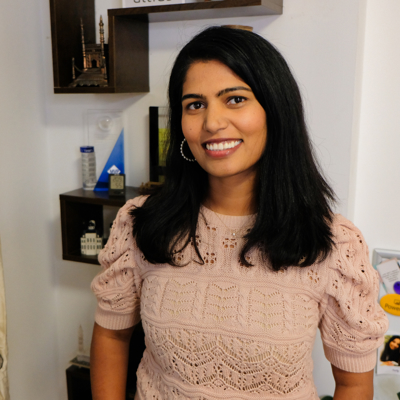
Real-World Data Engineering: Practical Skills for Microsoft Fabric
2025TL; DR
❓Are you wanting to get started with Fabric and want to know what all the parts are and do?
❓Have you been building data platforms for years and are looking to transition to Fabric?
This one-day collaborative workshop covers essential data engineering stages using Microsoft Fabric, incorporating practical experiences and best practices. The workshop is divided into key modules to help you understand and leverage Microsoft Fabric for your data engineering projects.
Session Details
❓Are you wanting to get started with Fabric and want to know what all the parts are and do?
❓Have you been building data platforms for years and are looking to transition to Fabric?
This one-day collaborative workshop covers essential data engineering stages using Microsoft Fabric, incorporating practical experiences and best practices. The workshop is divided into key modules to help you leverage Microsoft Fabric for your data engineering projects.
Overview
1. Introduction to Microsoft Fabric
Get an overview of Microsoft Fabric, focusing on its capabilities for Data Engineering within Business Intelligence solutions. Explore Lakehouse architecture, SQL Endpoint, Data Warehouses, Data Virtualization, and Semantic Models.
2. Hands-on Experience with Ingestion and Modelling using Notebooks, Pipelines, and Dataflows
Participate in practical workshops to learn data ingestion and transformation techniques using Notebooks (Python, Spark, TSQL), Datafactory Pipelines, and Dataflows Gen 2. Understand the tools' pros and cons and when to use each.
3. Architecting Solutions
Learn to architect robust and scalable data engineering solutions using Fabric Artifacts. This module covers frameworks for data transformation stages such as ELT, including logging and metadata capturing.
4. Environment Management
Discover how to create efficient workspace architectures, design user access control, and monitor data engineering solutions. Implement best practices for efficient and reliable data processes.
5. Applying Your Skills
Apply the techniques learned to real-world scenarios, and by the end of the day, you will have created an end-to-end data engineering solution ready for self-service BI.
Format: The training includes lectures, hands-on activities, and group discussions for a comprehensive learning experience.
❓Have you been building data platforms for years and are looking to transition to Fabric?
This one-day collaborative workshop covers essential data engineering stages using Microsoft Fabric, incorporating practical experiences and best practices. The workshop is divided into key modules to help you leverage Microsoft Fabric for your data engineering projects.
Overview
1. Introduction to Microsoft Fabric
Get an overview of Microsoft Fabric, focusing on its capabilities for Data Engineering within Business Intelligence solutions. Explore Lakehouse architecture, SQL Endpoint, Data Warehouses, Data Virtualization, and Semantic Models.
2. Hands-on Experience with Ingestion and Modelling using Notebooks, Pipelines, and Dataflows
Participate in practical workshops to learn data ingestion and transformation techniques using Notebooks (Python, Spark, TSQL), Datafactory Pipelines, and Dataflows Gen 2. Understand the tools' pros and cons and when to use each.
3. Architecting Solutions
Learn to architect robust and scalable data engineering solutions using Fabric Artifacts. This module covers frameworks for data transformation stages such as ELT, including logging and metadata capturing.
4. Environment Management
Discover how to create efficient workspace architectures, design user access control, and monitor data engineering solutions. Implement best practices for efficient and reliable data processes.
5. Applying Your Skills
Apply the techniques learned to real-world scenarios, and by the end of the day, you will have created an end-to-end data engineering solution ready for self-service BI.
Format: The training includes lectures, hands-on activities, and group discussions for a comprehensive learning experience.
3 things you'll get out of this session
By the end of the day, attendees will have:
✅An understanding of Fabric Data Engineering Artifacts, which to chose and when
✅The ability to architect, develop and delivery data engineering solutions on Fabric
✅Frameworks for logging and metadata capturing
✅Practical skills ready to be applied to your projects
✅A Notebook Framework, tools, and references for architecting solutions in Microsoft Fabric
Speakers
Prathyusha(Prathy) Kamasani's previous sessions
One dataset and three use cases with Microsoft Fabric
Are you curious about how to leverage Open Data with Fabric? In this demo filled session, I will show you how I import World Bank Open Data into Fabric using different methods: Pipelines, Data factory Gen-II, Notebooks and a mix of all three. Then I will demonstrate how I do modelling using Warehouse, Power BI Dataset model and Notebooks. Finally, I will create stunning reports using Power BI.
By the end of the session, attendees will get an idea of how each artifact would work, why one would use one over other artifacts, and understand how to create an end-to-end solution with Microsoft Fabric
Powering Up Your Power BI Development Workflow with Microsoft Fabric Notebooks
Are you excited about Microsoft Fabric and its Notebooks feature, but also feel overwhelmed by the different languages it supports, this session is for you. You will learn the basics of Python and Spark, and how to use Notebooks to write and run code. You will also discover how to leverage tools like CoPilot to assist you with code suggestions and corrections. Moreover, you will see how to use libraries like SemPy to enrich your Power BI development with advanced analytics. Join Prathy in this session and get ready to explore the possibilities of Notebooks in Microsoft Fabric.