 22-25 April 2026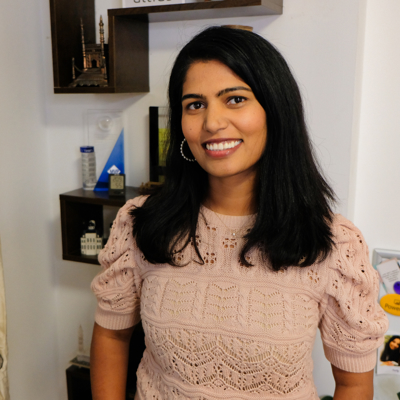
Prathyusha(Prathy) Kamasani
I’m Prathyusha (Prathy) Kamasani, a solopreneur behind Data Nova, a small, purpose-driven business specialising in Microsoft BI solutions. With over 15 years of experience in the data space, I take a design-first approach to everything I build. Whether I’m developing well-structured data platforms or creating user-centric Power BI reports, my goal is to make data accessible, intuitive, and genuinely impactful.
From delivering end-to-end Microsoft Fabric solutions to crafting interactive data visualisations, I bring together design and data to help organisations uncover the insights that truly matter.
I’m also passionate about sharing knowledge and building community. Since 2016, I’ve been running the London Microsoft Fabric User Group. You’ll often find me speaking at conferences or hosting events at the London Fabric User Group
Prathyusha(Prathy) Kamasani's Training Days
Real-World Data Engineering: Practical Skills for Microsoft FabricSQLBits 2025
❓Are you wanting to get started with Fabric and want to know what all the parts are and do?
❓Have you been building data platforms for years and are looking to transition to Fabric?
This one-day collaborative workshop covers essential data engineering stages using Microsoft Fabric, incorporating practical experiences and best practices. The workshop is divided into key modules to help you understand and leverage Microsoft Fabric for your data engineering projects.
Power BI Report Design and Development workshopSQLBits 2023
This one-day collaborative workshop will cover the various Power BI design stages learned from years of consulting and working with some of the largest enterprises. The workshop, divided into five modules, enables you to bring your end user's data to life with Power BI.
Power BI data visualizations & storytellingSQLBits 2022
During this full-day PreCon, we will review ways to determine what data to pick and present the data optimally and beautifully to diverse business users like Analysts, stakeholders, and Execs. We will achieve it by exploring psychology around how humans perceive data by looking into the gestalt principles of perception and applying these principles in data visualization best practices. We will also look at using corporate colour schemes, principles, and templates for reuse between the teams.
Prathyusha(Prathy) Kamasani's Sessions
Power BI Report Design and Development workshopSQLBits 2023
This one-day collaborative workshop will cover the various Power BI design stages learned from years of consulting and working with some of the largest enterprises. The workshop, divided into five modules, enables you to bring your end user's data to life with Power BI.
Demystifying Power BI Slicers and filtersSQLBits 2023
When it comes to Power BI Reports design, both slicers and filters have their own space and use cases. However, Slicers and filters are probably among the most frequently misused terms in Power BI design.
In this session, we will start with what are Power BI Slicers and filters. What are the differences between and when to use what? We will investigate the pros and cons of each and how to get the best of both filters and slicers in Power BI.
By the end of the session, attendees will get an overall view of Power BI slicers and filters in Power BI designing.
Power BI User Group: Ask Me Anything! Learn from the Experts and Boost Your SkillsSQLBits 2023
Join us for an hour of Q&A where we will answer all your Power BI questions live. Whether you want to know how to create interactive reports and dashboards, connect to different data sources, use advanced features like DAX and Power Query, or troubleshoot common issues, we have you covered.
Panel - Meagan Longoria, Chris Webb, Kasper De Jonge, Patrick LeBlanc, Alberto Ferrari and Prathy Kamasani
Power BI data visualizations & storytellingSQLBits 2022
During this full-day PreCon, we will review ways to determine what data to pick and present the data optimally and beautifully to diverse business users like Analysts, stakeholders, and Execs. We will achieve it by exploring psychology around how humans perceive data by looking into the gestalt principles of perception and applying these principles in data visualization best practices. We will also look at using corporate colour schemes, principles, and templates for reuse between the teams.
Power BI bookmarks in 20 minutesSQLBits 2022
In this 20 minute session, you will learn everything you need to know about bookmarks. We will start with creating your first bookmark to multiple bookmarks by understanding advanced settings that usually get overlooked. We will also look at how we can ease the design and Maintainance of bookmarks by using features like grouping, renaming, selection pane, and naming conventions. By the end of the session, you will learn to apply bookmarks like a pro!
An evening with Power BI CAT teamSQLBits 2022
SQL bits and London Power BI user group are brining a Q&A panel with some of Power BI CAT team members to ask everything about Power BI. Join us with your questions
Power BI Report design Tips and TricksSQLBits 2020
A demo's filled session packed with tips and tricks to show how to transform usual Power BI reports to stunning reports
Introduction to PowerApps and Integration with Power BISQLBits 2019
In this session, attendees learn about how to create PowerApps solutions, how to use PowerApps as data entry application for Power BI. How to integrate PowerApps in Power BI and Power BI in PowerApps.
Power BI deployment strategy for publishing and maintenanceSQLBits 2018
It takes minutes to create and share Power BI reports and users who has relevant Power BI access can do many things in the PBI service. In this session, Prathy will show how having a deployment strategy helps maintaining Power BI service.
Deep Dive into SSIDB CatalogSQLBits 2017
A session to understand the available functionality of SSISDB Catalog
Power BI Reporting: From Good to GreatSQLBits 2025
Feeling overwhelmed by the flood of Power BI reports and ideas? With so many options, it's easy to get stuck in analysis paralysis. But transforming a good report into a great one boils down to three key questions:
What's the goal?
Who's the audience?
How will it be shared?
In this session, I'll cut through the clutter and focus on practical examples that elevate your reports. You'll discover techniques and decisions that turn standard reports into impactful, story-driven insights. Learn how to refine visuals, enhance interactivity, and tailor your reports to captivate different audiences—all without overcomplicating your designs. Join me to make your Power BI reports truly shine!
Real-World Data Engineering: Practical Skills for Microsoft FabricSQLBits 2025
❓Are you wanting to get started with Fabric and want to know what all the parts are and do?
❓Have you been building data platforms for years and are looking to transition to Fabric?
This one-day collaborative workshop covers essential data engineering stages using Microsoft Fabric, incorporating practical experiences and best practices. The workshop is divided into key modules to help you understand and leverage Microsoft Fabric for your data engineering projects.
One dataset and three use cases with Microsoft FabricSQLBits 2024
Are you curious about how to leverage Open Data with Fabric? In this demo filled session, I will show you how I import World Bank Open Data into Fabric using different methods: Pipelines, Data factory Gen-II, Notebooks and a mix of all three. Then I will demonstrate how I do modelling using Warehouse, Power BI Dataset model and Notebooks. Finally, I will create stunning reports using Power BI.
By the end of the session, attendees will get an idea of how each artifact would work, why one would use one over other artifacts, and understand how to create an end-to-end solution with Microsoft Fabric
Powering Up Your Power BI Development Workflow with Microsoft Fabric NotebooksSQLBits 2024
Are you excited about Microsoft Fabric and its Notebooks feature, but also feel overwhelmed by the different languages it supports, this session is for you. You will learn the basics of Python and Spark, and how to use Notebooks to write and run code. You will also discover how to leverage tools like CoPilot to assist you with code suggestions and corrections. Moreover, you will see how to use libraries like SemPy to enrich your Power BI development with advanced analytics. Join Prathy in this session and get ready to explore the possibilities of Notebooks in Microsoft Fabric.
Ask the Expert - Group A (Thu 14:10 to 15:00)SQLBits 2024
Come and see to some of our amazing speakers on one of these topics:
1. SQL and Databases:
2. Microsoft Fabric and Related Technologies:
3. Power BI and Data Visualization:
4. Azure and Cloud Technologies:
London Fabric User Group - SQL Bits Special - Ask Me Anything PanelSQLBits 2024
Ask Me Anything session for a panel made up of special guests including Microsoft product group, CAT team and MVPs. Join us and ask any questions regarding Microsoft fabric and Power BI